Step-by-step guide to tracking items in Marathon
In this post you'll find a complete guide on how to track items in Marathon. Learn how to mark, locate on the map, and prioritize essential resources, such as Unstable Biomass and Unstable Diode , to optimize your raids. 🗺️
Tracking items in Marathon is essential for quickly locating the most important resources during raids on Tau Ceti IV. Many materials are used to craft ammunition, consumables, or upgrade equipment and factions , and finding each item without organization can be time-consuming and frustrating.

By using the tracking system, you can mark the most relevant objects, see where they might appear on the map, and plan their collection in an organized way. In this guide, you will learn step-by-step how to track items in Marathon. Check it out!
Step 1: Select the items you want to track
To begin, open your inventory or safe and select the item you wish to monitor. With the item highlighted, press R on the keyboard or R3 on the controller. When the item is correctly marked, a green eye icon will appear above it.
After marking the item, it is added to the tracking list. If you want to monitor multiple items at the same time, you can access them all by clicking the gear icon at the bottom of the interface . The complete list appears on the left side of the screen, making it easy to track during incursions.
Step 2: Locate the items on the map
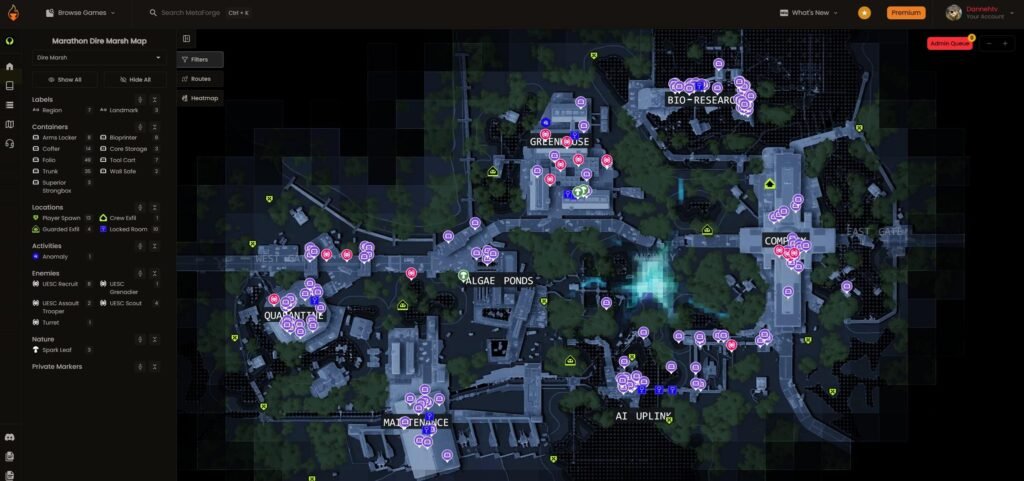
With the items marked, you can enter any map in the game, such as Perimeter , Dire Marsh , or Outpost . When you open the map, points of interest that have a chance of containing the tracked items will be highlighted with a green marker next to the area name.
By selecting the marker, you can get more details about the location and confirm if it's a suitable spot to pick up the desired resource. In this way, tracking helps you plan your route and quickly identify where the most important items are.
Step 3: Prioritize the most relevant resources
Not all items are equally important. Some materials are essential for crafting ammunition, consumables, or faction upgrades. Therefore, prioritizing certain resources when tracking items in Marathon makes the process more efficient and prevents you from wasting time on less useful objects.
Examples of strategic items include:
- Unstable Biomass : Used for patch kits and CyberAcme upgrades. Frequently appears in Perimeter (Hauler and Overflow) and Dire Marsh (Algae Ponds and Greenhouse).
- Unstable Diode : Useful for shield loads and Sekiguchi upgrades. Found in Perimeter (North and South Relay) and Outpost (Flight Control and Dormitories).
- Unstable Gel : Used for Volt batteries and Arachne upgrades. Located in Dire Marsh (Bio Research) and Outpost (Orientation and Processing).
- Unstable Weapon Metal : Required for light ammunition and Traxus upgrades. Found in Perimeter (Station) and Dire Marsh (AI Uplink and Maintenance).
- Unstable Lead : Used for heavy ammunition and MIDA upgrades. Found in Dire Marsh (Quarantine and Complex) and Outpost (Airfield).
Focusing on these items helps you make the most of each incursion and track items intelligently in Marathon.
Step 4: Monitor the items during the raid
During the raid, the items you are tracking appear on the map with green indicators at points of interest. These markers show where the selected resources are most likely to appear, making it easier to find them quickly.
It's important to remember that the tracking system doesn't change the likelihood of items appearing . It only shows the locations where each item is most likely to be found, helping to organize the collection process.
You can mark multiple items simultaneously without restrictions. This means you can track all the resources needed for a long and complex expedition, optimizing your time and preventing you from having to return multiple times to collect different materials. Having a complete list of tracked items ensures you can plan your expedition clearly and make the most of each point of interest.
Tips for tracking items in Marathon

- Always update whenever you use or move an item : this prevents confusion and keeps the record accurate.
- Prioritize important items : mark first those that are most relevant for manufacturing and improvements.
- Use visual markers : the green eye helps to quickly locate each feature.
- Review your list before embarking on excursions : this way you ensure you haven't forgotten anything.
Tracking items in Marathon provides a clear overview of all available resources in Tau Ceti IV, helping you prioritize the points most worth visiting during your incursions. More than simply marking objects, the system helps you keep track of what you've already found and identify patterns in the locations where each item typically appears.